your goal:
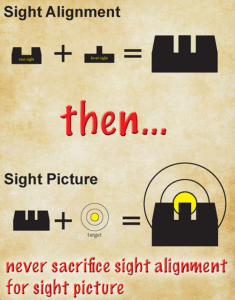
- sight alightment
- then sight picture
How to Use:
- enable camera use when prompted if you want something to aim at
(use the digram at top of this page for correct sight picture) - on a desktop or laptop, use your mouse or trackpad to align the sights
- on a smartphone or tablet, use your finger to align the sights
- you can see the accuracy bars at the bottom of the screen.
- ready ? click below to practice the visual skill of sight alignment.